Dext vs Hubdoc in Australia: which one to use

Dext vs Hubdoc in Australia comes down to what you need from each bill.
- Use Hubdoc if you only need each bill's supplier, date and total filed, and you already have Xero.
- Use Dext if you need bills posted straight into Xero, MYOB or QuickBooks Online. It costs from A$36.94 a month, and line items and bank statements cost extra.
- Use Nectabl if you want line items, bank statements and checks in one price, as a spreadsheet that works with any accounting software. It suits one business or a whole practice, and it's free for 20 pages a month.
For more options, see Dext alternatives in Australia.
Try Nectabl on your own paperwork 20 pages a month free. No credit card needed.
Dext vs Hubdoc vs Nectabl at a glance
All prices are in Australian dollars and include GST.
| Dext | Hubdoc | Nectabl | |
|---|---|---|---|
| Price a month | A$46.20 for 250 documents | About A$17, free with Xero | A$24 for 200 pages, free for 20 pages a month |
| Line items | Extra cost | Not read | Included |
| Bank statements | Extra cost | Not read | Included, every balance checked |
| Sends data to | Xero, MYOB, QuickBooks Online | Xero, QuickBooks Online | Excel, CSV, a Xero import file |
| Setup | Clients, roles and deadlines | None | None |
What Hubdoc costs
Hubdoc costs nothing extra on a Xero business plan. On its own, Hubdoc costs about A$17 a month, charged as US$12.
Dext pricing in Australia
Dext's business plan costs A$46.20 a month, or A$443.30 a year if you pay yearly. That covers 250 documents a month and 5 users. Line items, bank statements and supplier statements each cost extra. Line items cost from A$31.35 a month, and bank statements from A$18.70. Bookkeeping practices use a separate plan, priced by client.
Line items are the biggest difference
Hubdoc reads the supplier, amount, invoice number and due date. It doesn't read line items, so you can't split a bill across accounts or check it against its own lines. Dext reads line items as a paid add-on. Nectabl reads them on every plan. It adds them up in whole cents and compares them with the printed total.
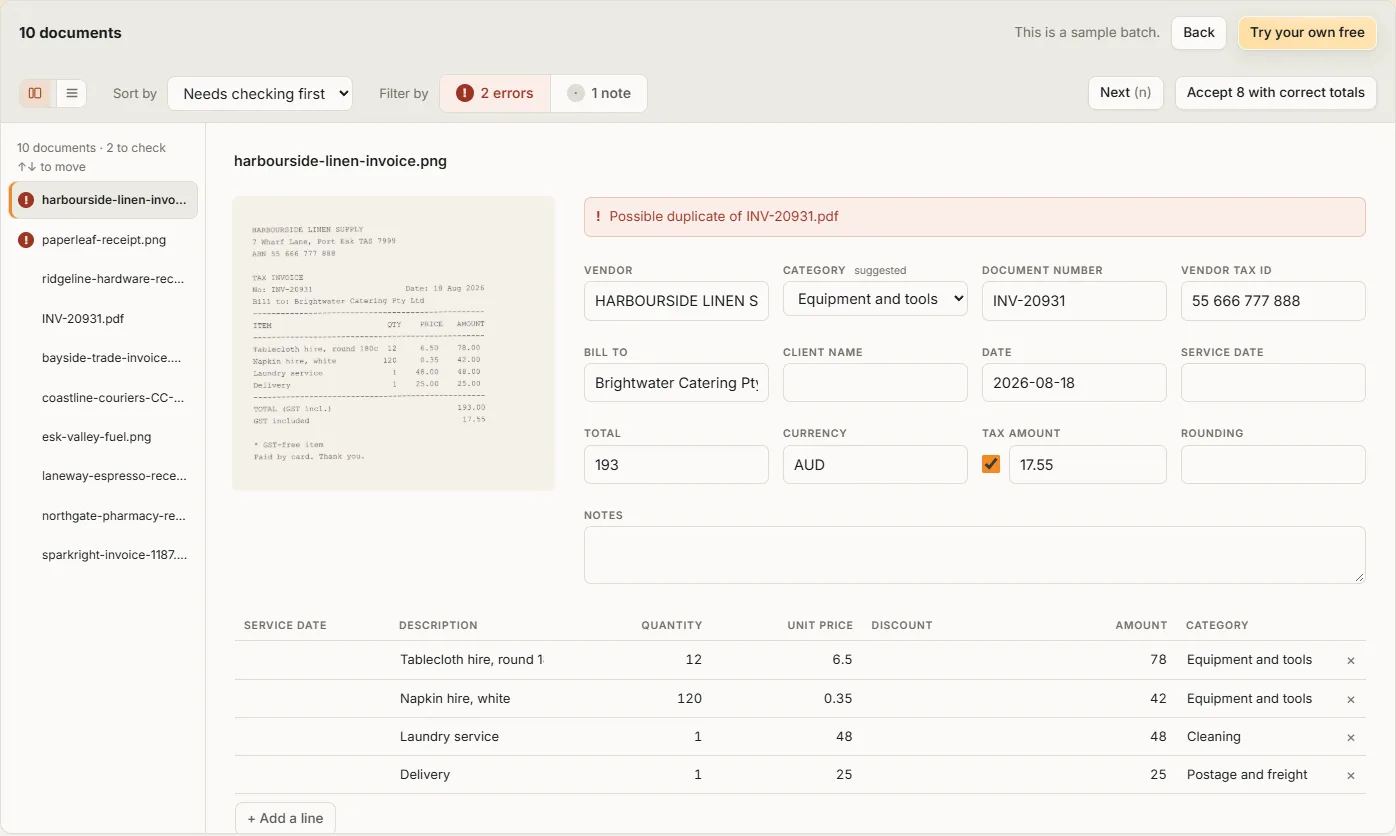
What each one caught in our test
In September 2026 we gave Dext, Hubdoc and Nectabl the same nine documents. Seven had a mistake added on purpose. None of the three gave a false warning on the two correct ones.
| The mistake | Dext | Hubdoc | Nectabl |
|---|---|---|---|
| GST higher than one eleventh of the total | Missed | Captures no tax | Caught |
| Quantity times price that disagrees with the line | Missed | Captures no line items | Caught |
| An ABN that isn't valid | Missed | Missed | Caught |
| The same invoice twice | Caught | Caught | Caught |
| A statement whose rows don't add up to its closing balance | Missed | Didn't process it | Caught, and named the row |
When Nectabl is the better choice
- You want a spreadsheet at the end, not entries in your accounting software.
- Your clients use different accounting software, or none.
- You want the GST and line totals checked before they reach a BAS.
- Your work is seasonal, and you'd rather pay by the page than per user or per client.
What Nectabl doesn't do
- There's no integration with Xero, MYOB or QuickBooks. Nectabl gives you the file, and you import it.
- There's no bank feed matching, no approvals and no mobile app.
- The only supplier rule is the category. When you correct it, Nectabl remembers it for that vendor.
Common questions
Is Hubdoc free with Xero?
Yes. Xero business plans include Hubdoc at no extra cost. Without Xero, Hubdoc costs about A$17 a month, charged as US$12.
Does Dext work with MYOB?
Yes. Dext posts to Xero, QuickBooks Online and MYOB. Hubdoc posts to Xero and QuickBooks Online only.
Is Receipt Bank the same as Dext?
Yes. Receipt Bank changed its name to Dext in 2021. It's the same product, and it costs from A$36.94 a month.
What about Xero's own Smart Document Capture?
Xero now reads receipts and bills itself, in the Documents section. It comes with every Xero small business plan. It creates the transaction in Xero and matches it to your bank feed. It only works inside Xero, and Xero says bank statements are still to come. If you're on Xero and only need bills entered, try it before you pay for Dext.
Is Dext worth paying for if Hubdoc comes with Xero?
Dext is worth it if you need bills posted straight into MYOB, or its tools for managing clients. If you only need each bill filed in Xero, Hubdoc is enough. If you need line items checked, Nectabl includes them in every plan.
Try it on your own paperwork 20 pages a month free. See what the paid plans cost.
Xero's features checked on xero.com on 13 October 2026. Prices checked on dext.com and hubdoc.com on 8 October 2026. Dext lists its prices before GST, so we added 10%. Hubdoc charges in US dollars, converted at the 7 October 2026 rate. Tools change, so check their own sites before you decide. If we got something wrong, email support@nectabl.com and we'll correct it.